The Technitium DNS console, rebuilt in Vue.
VueTechnitium is a complete, ground-up rewrite of the Technitium DNS Server web console. The same DNS engine you already trust — now with a faster, cleaner, fully reactive interface and features the classic UI never had.
Built for the people who
actually run the DNS server.
VueTechnitium keeps everything the classic console can do and rethinks how it feels — then adds the things power users have been asking for.
A complete UI rewrite
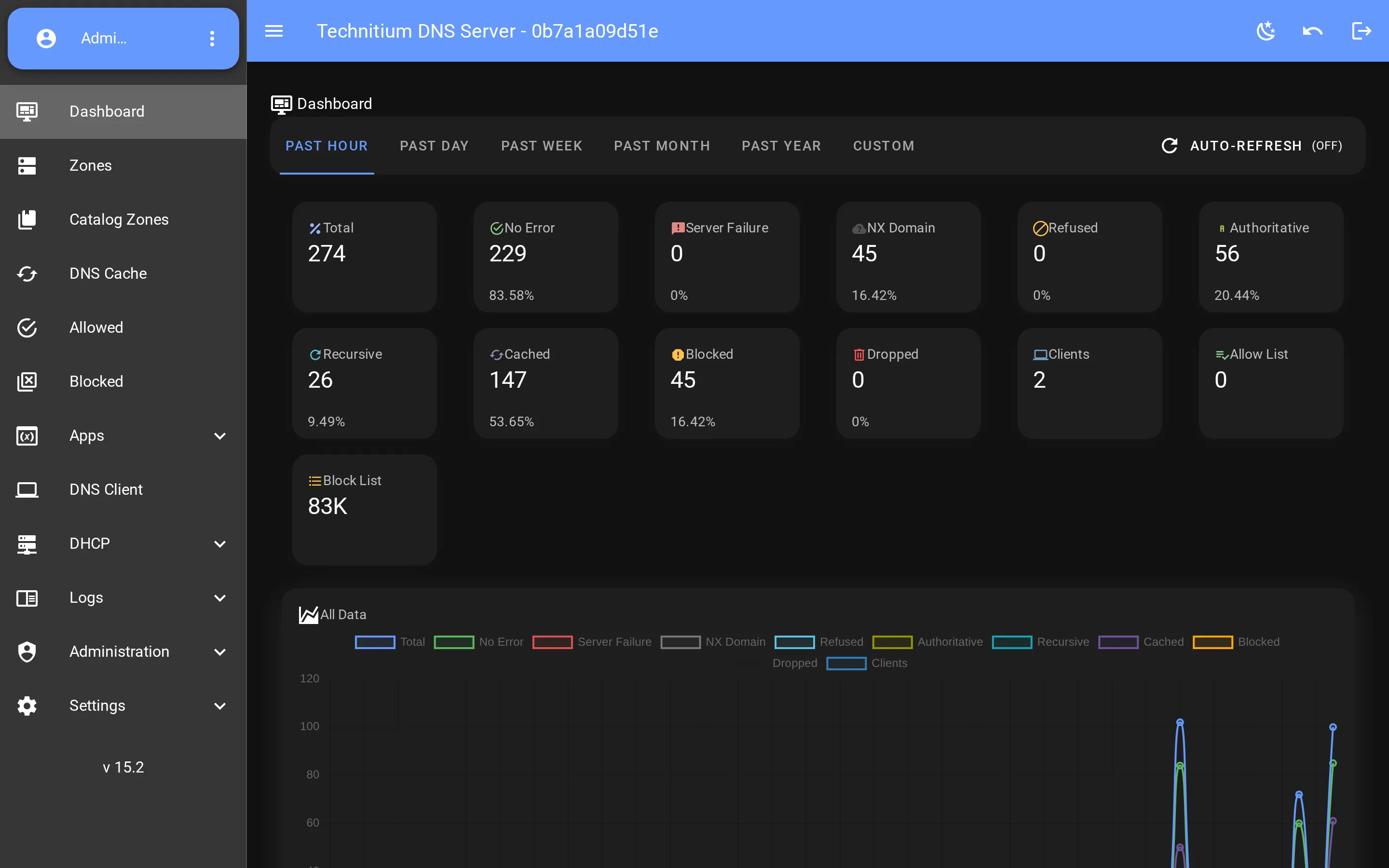
Every screen rebuilt from scratch on Vue 3, Vuetify and Pinia. Reactive, quick, and consistent — no more full-page reloads, no jQuery spaghetti.
- Vue 3 · Vuetify · Pinia
- Reactive — no page reloads
- Built-in light & dark themes
Everything you already manage
Full parity with the classic console — Dashboard, Zones, Cache, Allowed & Blocked, Apps, DHCP, Logs, Settings and Administration. All there, all redesigned.
- Dashboard · Zones · Cache · DHCP
- Apps · Logs · Settings
- Role-based access & permissions
New power features
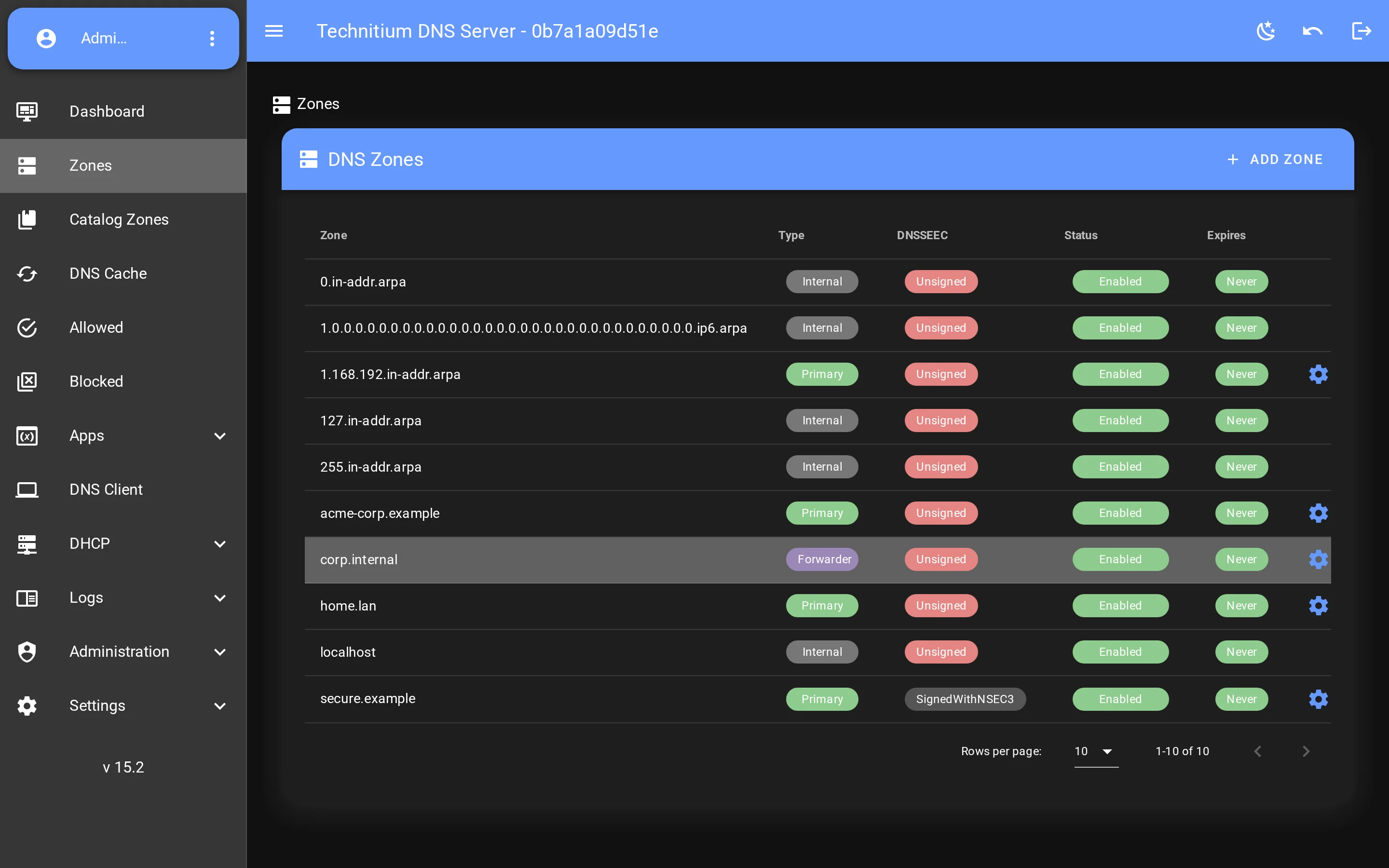
Things the legacy UI never had: multi-node cluster management with a node switcher on every screen, a full DNSSEC properties manager, catalog zones, personal API tokens and server-side pagination.
- Multi-node cluster management
- Full DNSSEC key management
- Catalog zones · API tokens
A true drop-in
VueTechnitium talks to the exact same Technitium DNS Server API. Ship it next to the classic UI and switch between them with a single toggle — no migration, no data changes.
- Same Technitium DNS API
- Switch UI with one toggle
- Zero migration, zero risk
Same trusted engine.
A brand-new console.
Technitium DNS Server is a fast, open-source DNS server — but its classic web console has aged. VueTechnitium keeps the engine exactly as it is and replaces only the front-end, so you get every feature you rely on with an interface that finally feels modern.
It speaks the same HTTP API, honours the same users, roles and permissions, and runs from the same server. Drop it in, flip a toggle, and your team gets a faster console — with zero risk to your DNS.
Everything in Technitium 15.2,
plus what we added on top.
VueTechnitium tracks Technitium DNS Server and layers on a modern console — and features the stock build simply doesn't ship.
A brand-new Vue 3 console
The classic jQuery console is replaced by a fast, reactive Vue 3 interface — served by default, with one-click switch back to the legacy UI.
A Honex app store, with first-party apps
Install and update DNS Apps straight from the Honex CDN catalog — including UniFi DHCP Sync, a first-party app that writes your UniFi controller's leases into your zones as real, editable A/AAAA and PTR records, with reserve/release right from the DHCP Leases table. A new SDK hook lets any app publish stored zone records. Side-loading from a .zip works too.
Audit trail
Every admin action — logins and failures, logout, password & 2FA changes, API tokens, session revokes, user/group/permission edits and SSO updates — recorded, persisted to disk and browsable.
Per-app debug logs
Each installed DNS App's debug output is captured into its own buffer, with view, clear, enable and max-entry controls.
DHCP reservations, front and centre
Manage each scope's static (reserved) leases from a dedicated page — view, add, edit and delete reservations without wading through the full scope editor.
Console quality-of-life
A JSONC editor with syntax highlighting and comments for app configs, pinned zones hoisted to the top of the list, every log view grouped under one Logs tab, and per-table sorting that persists between visits.
Tokens stay out of the URL
The console authenticates with an Authorization: Bearer header, so session tokens never land in URLs, server logs or browser history.
Cluster control in the console
Initialize, join, promote, resync and manage every node from a Cluster Management view — with a global node selector in the nav bar.
DNSSEC & catalog zones, visualised
Sign and unsign zones, roll KSK/ZSK keys, convert NSEC↔NSEC3 and manage catalog zones — all first-class in the redesigned console.
See it in action.
The real console, running against a live Technitium DNS Server with demo data. Click any image to enlarge.
Install it. Open the new console.
VueTechnitium ships as a complete Technitium DNS Server build from Honex. Pick a method below — everything downloads from our own CDN and container registry.
Install the server
Runs on Linux x64, Windows, or anywhere Docker runs. Out-of-the-box with zero configuration.
Pull the image we publish to our GitLab Container Registry, or use docker-compose.
docker run -d --name dns-server \
  -p 5380:5380 -p 53:53/udp -p 53:53/tcp \
  -v dns-config:/etc/dns \
  registry.gitlab.com/honex/vuetechnitium:latest

# or, from the repo:
docker compose up -dhttp://localhost:5380Default login is admin / admin — change it right away.Open the new console
The redesigned VueTechnitium console is built into every Honex release.
ui-version cookie to new.